How to Make One Grocery List From Several Recipes
Four brunch recipes asked for 9, 6, 8 and 2 eggs. We tested what a grocery list tool should add up, and what it should never merge.
To make one grocery list from several recipes, put every ingredient line in one place. Add up the lines that are the same thing you buy, keep apart the ones that only look alike, and sort what is left by aisle. Four brunch recipes we tested asked for 9 large eggs, 6 eggs, 8 large eggs and 2 eggs. That is 25 eggs, two dozen and one more, and it is easy to buy too few when the numbers sit on four different tabs.
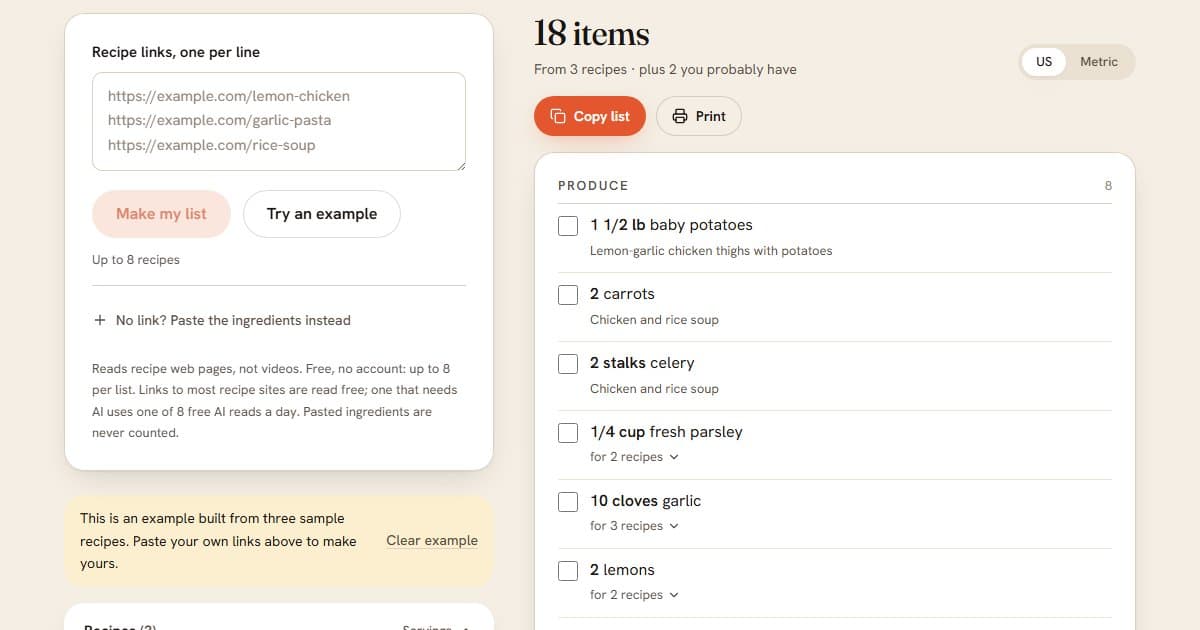
Our free grocery list generator does this from up to 8 recipe links. The rules it follows work as well if you are writing the list yourself, and if you are planning the week first, start with meal planning for beginners.
Step by step
- Copy the recipe links. One per line. Pasting a whole message with links in it works too, because the words are dropped and only the links are kept.
- Paste them and press "Make my list". A list holds up to 8 recipes.
- Set the servings. Open the Recipes panel and use + and − on each recipe. This only appears when the page states how many it serves; otherwise the line reads "Servings not given, so amounts stay as written."
- Read the rows with two amounts. See "When one row has two amounts" below.
- Shop from it. Tick items as they go in the cart, or use Copy list, Print, or Share where your device offers it. The list and your ticks stay in this browser.
What gets added up
The same product written different ways becomes one row. In a weeknight chicken-and-rice trip, three recipes asked for "2 cups chicken broth", "1 1/2 cups (375 ml) chicken broth/stock (, hot (I microwave))" and "1 ½ cups reduced sodium chicken broth". The list shows one row, "5 cups chicken broth", under Canned Goods. Prep words such as diced, unsalted, boneless and large are ignored when matching. Broth and stock count as one product, and so do scallions and green onions.
Units add only where it makes sense. Volume adds to volume, weight to weight and counts to counts. Cups and grams are bridged only for ingredients with a known weight, such as flour, sugar, butter, rice and cheese. A stick of butter is 8 tablespoons, so three recipes' butter came out as "1/2 cup butter (1 stick)".
Every merged row says which recipes need it. Tap "for 3 recipes" and the names open underneath.
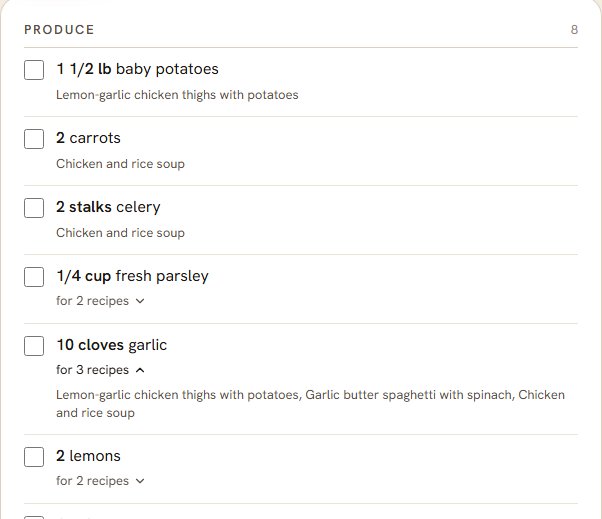
That garlic row comes from the tool's built-in example: "4 cloves garlic, minced", "3 cloves garlic, sliced" and "3 cloves garlic, minced", which add up to 10 cloves.
What stays apart
A wrong merge does more damage than a missed one, because a combined row looks finished. These are never merged:
- Garlic and garlic powder. The chicken-and-rice trip shows "Garlic: 1 tsp minced + 6 cloves" in Produce and "1/2 tsp garlic powder" in Herbs & Spices.
- Onions, red onions and green onions.
- Chicken breasts and chicken thighs.
- Fresh and dried herbs, and fresh and ground ginger.
- Fresh and canned tomatoes, and sweet potatoes and other potatoes.
- Different cheeses.
A line offering two different products stays as written, so "1/2 cup rice or cider vinegar" keeps both names and you choose at the shelf. An ingredient the tool does not recognize is never merged by guesswork. If it cannot tell that two lines are the same thing, it shows two lines.
When one row has two amounts
Some amounts cannot be added. In a trip of two soups, a stuffing and an adobo, each soup asks for "1 large onion (chopped)" and the stuffing asks for "2 cups yellow onion, (diced, from 2 medium onions)". Cups of diced onion and whole onions are different units, so the row reads "Onions: 2 cups diced + 2 whole".
The stuffing's own note says 2 medium onions make its 2 cups, so you need 4 onions. The same trip produced "Celery: 2 cups diced + 4 stalks" and "Chicken breasts: 1 lb + 2 whole". Read rows like these before you leave the house.
Salt, pepper and water
Salt, black pepper and water go into a group at the bottom called "You probably have these". They still add up (the chicken-and-rice trip needed 1 3/4 tsp salt across four recipes) but they are left out of the item count. The free tool does not know what is in your pantry, so it lists everything else.
How we scored it
We built a test set of 20 real recipe pages: 10 from jocooks.com, 5 from Spend With Pennies, and 2 each from RecipeTin Eats and Once Upon a Chef, plus 1 from Pinch of Yum. They form 5 shopping trips of 4 recipes each: weeknight chicken and rice, brunch, potatoes, an Italian chicken night, and soups with a stuffing and an adobo. Each trip was run four ways (all 4 recipes and three smaller combinations), which makes 20 lists. A hand-checked answer key says what each list should contain, the total amount of each item and its aisle.
Each list is scored out of 100:
| Part of the score | Weight |
|---|---|
| Every needed item is on the list | 25% |
| The total amount is right (merged rows count 4 times as much as single ones) | 35% |
| No item appears on two rows | 15% |
| No two different items share a row | 10% |
| Each item sits under the right aisle | 10% |
| No invented rows | 5% |
Copying every ingredient line onto one list, with no merging and no aisles, scores 65.9 (64.0 on the full trips). That is the number a tool has to beat to be better than copy and paste.
On October 31, 2026, the current build scored 96.1 across the 20 lists and 96.9 on the 5 full trips. We built and tuned the tool against these same trips, so read the score as a check that it does what we meant it to, not as an outside test. We sent each recipe's ingredient lines exactly as the page publishes them, so page reading was not part of this test.
There is no rival column. We meant to compare against plan2meal's grocery list generator, but it answered "Bot detected" to all 20 automated runs, and we did not try to get around that.
Which links work
- Most recipe blogs publish their recipe as structured data, and those pages are read free, with no AI.
- A page without that data is read by AI, which uses one of 8 free AI reads a day, shared with our other free link tools.
- Video links from YouTube, TikTok, Instagram and Facebook are turned away with a pointer to our video tools. Get the recipe there, then paste its ingredients.
- Some sites refuse automated requests. When we tested in October 2026, Allrecipes, Serious Eats and Simply Recipes refused our automated requests. For those, open "No link? Paste the ingredients instead", which takes up to 80 lines and never uses an AI read.
Where it is still wrong
- Prep and label words are dropped when matching, which is usually what you want, though not always. "Reduced sodium chicken broth" and plain chicken broth end up on one row. If the salt matters, open the row to see which recipes asked for which.
- Rows with two amounts, like the onions above, still need your arithmetic.
- A line naming two herbs stays whole. In the potato trip, "1/4 cup fresh sage and thyme" sat on its own row next to "2 tbsp fresh thyme", so the thyme appears twice.
- In the soup trip, a bare "½ teaspoon thyme" was filed as dried thyme, apart from the fresh thyme in the other recipes. Our own answer key counted that as a duplicate and took points off. We kept the two rows because fresh and dried thyme are different purchases.
- A page read by AI can lose amounts. A row with no amount shows only the name, so check it against the recipe.
Keep the list and the recipes
The list stays in your browser, which is fine for one trip. To keep the recipes, press the save button on the list ("Save these 4 recipes — free" for a four-recipe list). They go into a free RecipeClip account, which holds up to 50 recipes and can build a grocery list you check off on your phone. The help article shows every part of the page, and our post on a shared grocery list that works covers splitting the shopping between two people.
Disclosure: RecipeClip publishes this blog and makes the grocery list generator.
Frequently Asked Questions
Can I make a grocery list from recipe links for free? Yes. The grocery list generator takes up to 8 recipe links per list, with no account. Links to most recipe sites are read free, and a page that needs AI uses one of 8 free AI reads a day.
What if a recipe site will not load? Open "No link? Paste the ingredients instead", copy the ingredient list from the recipe and paste it. Pasted ingredients are added to the same list and never use an AI read.
Will it combine garlic and garlic powder? No. They are different things to buy, so they get separate rows in different aisles.
Does it take out what I already have? The free tool lists everything, with salt, pepper and water set apart in a "You probably have these" group. A grocery list built inside a RecipeClip account can leave out what is in your pantry.